
Click Toolbox > Multi Blend to apply multi-color blends with accordion spacing to selected tatami objects.

Use Docker > Multi Blend to add, edit, and reorder layers while keeping objects intact.
|
Click Toolbox > Multi Blend to apply multi-color blends with accordion spacing to selected tatami objects. |
|
Use Docker > Multi Blend to add, edit, and reorder layers while keeping objects intact. |
The new Multi Blend feature builds on and greatly extends the capabilities of the former Color Blending tool.
It delivers smooth, natural color transitions and sophisticated shading – all within a single, editable object. It is available under Toolbox > Multi Blend or Docker > Multi Blend.
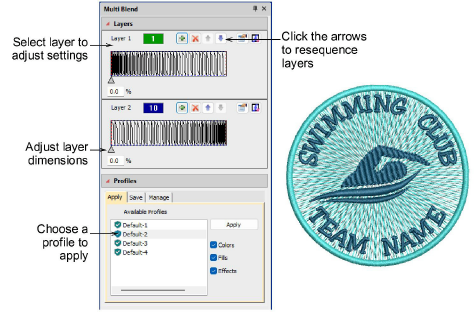
With Multi Blend, you can create multiple layers of stitching using any combination of stitch types, fill styles, and special effects. Add as many layers as needed to achieve the perfect tonal depth or gradient.
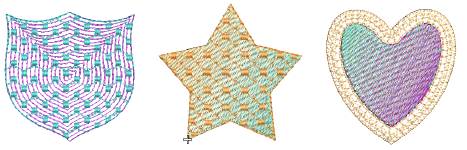
3Create multi-color blends and natural shading from a single, editable object.
3Add any number of stitch layers using varied stitch types, fills, and effects.
3Adjust, reorder, or restyle layers individually without compromising object integrity.
3Save and reuse profiles with preferred colors, fill types, and effects for consistency and speed.
3Convert existing Color Blending effects automatically into editable Multi Blend layers.
3Compatible with Complex Fill (Tatami) and Column A/B or C objects, with or without Trapunto and Underlay effects applying.
Products
EmbroideryStudio Add-ons
Solutions
Learning
Support
Connect
About Wilcom
