
Use Standard > Output Files to generate all required outputs – design files (EMB), machine files, and worksheets (PDF) – using an output profile.
|
|
Use Standard > Output Files to generate all required outputs – design files (EMB), machine files, and worksheets (PDF) – using an output profile. |
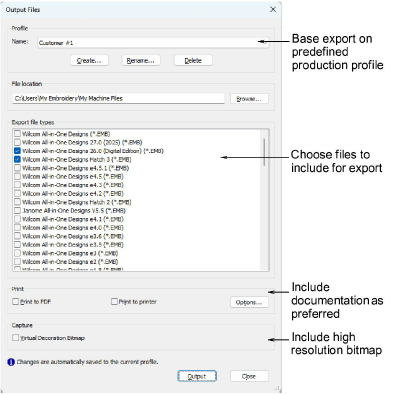
The new Output Files tool prepares production-ready outputs from your design in one step using a saved output profile. A profile can include:
3Machine files: one or more formats – e.g. DST, PES, EXP.
3Design files: one or more EMB file formats. These may include formats used by customers.
3Worksheets: Print and/or save production worksheets or approval sheets.
Set a target destination in the profile or choose at run time.
Use Output Files whenever you need to:
3Deliver machine files in multiple formats for machine or customer.
3Generate and print/PDF production worksheets or approval sheets.
3Repeat the same export/print steps without reconfiguring options each time.
3Replaces multi-step tasks with one click via profiles.
3Supports multiple machine formats and multiple worksheets in a single batch.
Note: It works in both Design Window and Design Explorer. But from Design Explorer you can batch-convert multiple selected designs to multiple machine file formats – DST, EXP, SEW, etc.
3Output current design to multiple formats
3Output selected designs to multiple formats
Products
EmbroideryStudio Add-ons
Solutions
Learning
Support
Connect
About Wilcom
