Simple runs

Run00043.png 

Use Outlines > Run to place a row of single run stitches along a digitized line. Right-click for settings.

TripleOutline.png 

Use Outlines > Triple Run to place a triple row of run stitches along a digitized line. Right-click for settings.

SculptureOutlline.png 

Use Outlines > Sculpture Run to create a thick-thin outline alternating single and triple stitches for a hand-stitched look.
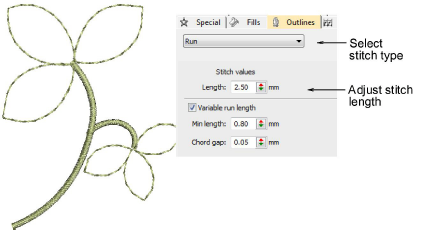
Use Run to digitize lines of simple run stitching. Use Triple Run for emphasis. This stitch type is typically used for thicker borders and outlines. Sculpture Run creates thick-thin alternating single and triple stitching for a hand-stitched look. Adjust stitch length, chord gap, stitch repetitions, and other settings via the Object Properties docker.

MakeOutlines7.png

Related video

Related topics...

3Access object properties

3Digitizing outlines & details

3Simple run stitching

3Stitch length settings

3Run count setting