
Use Stitch Effects > Trapunto to force underlying travel runs to the edges of a selected object. Right-click to adjust Trapunto settings.
|
|
Use Stitch Effects > Trapunto to force underlying travel runs to the edges of a selected object. Right-click to adjust Trapunto settings. |
 The Trapunto effect automatically shifts underlying travel runs to the edges of complex tatami fill objects so they remain hidden. This prevents visible overlaps, spacing variations, or segment joins that can spoil shading and open-stitch effects. Commonly used for background fills and dimensional shading, Trapunto works especially well with Accordion Spacing, which varies stitch density to create depth and pattern variation. Together, these effects can also be combined with Liquid and Florentine fills to produce smooth, curved color blends with a clean, professional finish.
1With or without a complex fill object selected, right-click the Tatami icon to access object properties.
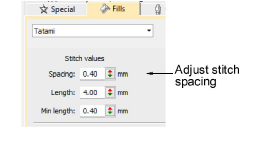
2In the Spacing field, enter the required stitch spacing. The larger the value, the more open the spacing.
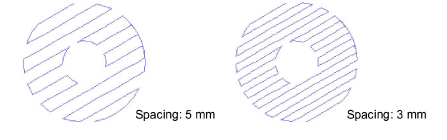
3Press Enter.
4With the complex fill object selected, click the Trapunto icon. Travel runs and overlapping rows are removed and consistent row spacing applied.
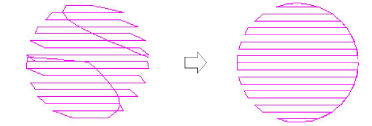
Note: Trapunto effect overrides whatever tatami backstitch settings currently apply.
Products
EmbroideryStudio Add-ons
Solutions
Learning
Support
Connect
About Wilcom
