The Wilcom EmbroideryStudio suite comprises
four product levels. These are powerful, well featured, professional embroidery
applications for different needs. Some ‘Elements’
are available at extra-cost. Some are provided as standard in higher product
levels.
Element |
|
1 |
2 |
3 |
4 |
Features |
Reference |

|
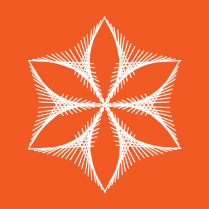
Maze
Fills |
Automatically
fill large areas with double-spiral stitching that never crosses
itself. |
○ |
– |
– |
– |
Maze
Fill |
Maze fills |
|
String
Stitch |
Create outline or filled shapes with overlapping ‘string art’
stitching to hold mirror pieces or for decorative effects. Known
as ‘Paghadi’ in India. |
○ |
– |
– |
– |
String |
String stitching |

|
Hand
Stitch |
Create hand-stitch effects which combine randomized spacing
and stitch angles for a more organic look. Apply to satin, tatami,
run, backstitch, and other stitch types. |
● |
○ |
– |
– |
Hand Stitch |
Hand stitch effect |

|
Motifs |
Create motif runs. Apply 3D Warp distortion. Create
and reuse motif patterns. |
○ |
– |
– |
– |
Motif Run |
Motif runs |
Create
Motif |
Custom motifs |
3D Warp |
Enveloped motif fills |

|
Motifs Advanced |
Create paired (two-part)
motif fills. Create motif runs with variable or gradient motif
size and spacing effects. Motifs can also conform to varying size
column shapes. |
○ |
– |
– |
– |
Paired Motif Fill |
Motif fills |
Motif
Run |
Create graded motif runs |
Motif
Column |
Create graded motif columns |

|
Custom Splits |
Add carving, embossing and other dimensional
effects to your embroidery. |
○ |
– |
– |
– |
Flexi
Split |
Flexi-splits |
Carving
Stamp |
Creating patterns with custom splits |
User
Defined Split |
User-defined splits |

|
Photo Flash |
Convert black and white, grayscale and color
images into embroidery. |
● |
○ |
– |
– |
Photo Flash |
Auto-digitizing with Photo Flash |
Color PhotoStitch |
Auto-digitize with Color PhotoStitch |
|
Reef
PhotoStitch |
Convert photos into embroidered designs in seconds. Automatically
fill large areas with open stitching reminiscent of a coral reef. |
● |
○ |
– |
– |
Reef PhotoStitch |
Auto-digitizing with Reef PhotoStitch |
1 ES Designing 2 ES Decorating 3 ES Editing 4 ES Lettering ● Included as standard ○ Modular ‘element’ |
Element |
|
1 |
2 |
3 |
4 |
Features |
Reference |

|
Single Sequin |
Create artistic sequin designs with sequin
runs and sequin fills for single sequin machines using automated
predefined fixing stitches. |
○ |
○ |
– |
– |
Sequin
Run |
Creating sequin runs |
Sequin
Fill |
Creating sequin fills |

|
Sequins Advanced |
Create embroidery files for single and twin-sequin
dispensing machines. |
○ |
– |
– |
– |
Advanced
Sequin |
Advanced Sequins |
Sequin
Fill |
Creating sequin fills |
Twin
Sequin |
Creating multi-sequin runs |
Multi
Sequin |

|
Beading |
Provides
support for beading devices. Classic fixing methods available:
upright, flat, and sideways. |
○ |
– |
– |
– |
Bead
Run |
Bead Embroidery |

|
Font Creator |
Match logo type exactly or create unique
ones all your own. |
○ |
– |
– |
– |
Create
Letter |
Creating custom fonts |
Convert
TrueType Font |
Converting TrueType fonts to embroidery |

|
Chenille |
Add
chenille embroidery capabilities to a lockstitch embroidery digitizing
system. |
○ |
– |
– |
– |
Chenille |
Chenille
Supplement |

|
Schiffli |
Create
and prepare lacework and emblems precisely and efficiently. |
L |
– |
– |
– |
Schiffli |
Schiffli
Supplement |
1 ES Designing 2 ES Decorating 3 ES Editing 4 ES Lettering ● Included
as standard ○ Modular ‘element’ L Available
in HL only |