|
|
Use Auto-Digitizing > Color PhotoStitch to automatically turn photographs and other bitmap artwork into multi-colored embroidery. |
|
|
Use Auto-Digitizing > Color PhotoStitch to automatically turn photographs and other bitmap artwork into multi-colored embroidery. |
Amongst new and improved auto-digitizing features, EmbroideryStudio provides a powerful new Color PhotoStitch tool. See also Auto-digitize with Color PhotoStitch.
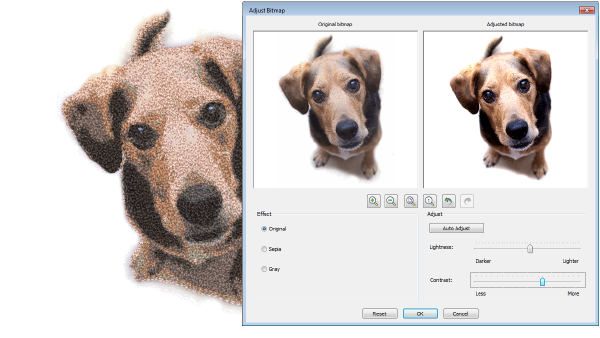
Process...
Import a photo/picture.
Optionally, crop the image.
Optionally cut out/mask background from the foreground with the cropping functions. You can do additional passes of the same photo with different cropped areas.
Optionally adjust lightness and contrast in the image.
Set the number of thread colors to use.
Map image colors to a selected thread chart.
Optionally, adjust stitching resolution to high, medium, or low. High resolution allows greater detail but with a higher stitch count.
Automatically convert to stitching using multiple thread colors.
Optionally, edit the resulting embroidery objects. Stitching created by Color PhotoStitch is editable as individual Manual Stitch objects. Select and delete as preferred and/or digitize other objects over the top.
|
Copyright ©2023 Wilcom Pty Ltd | Terms of Use | Privacy Policy |