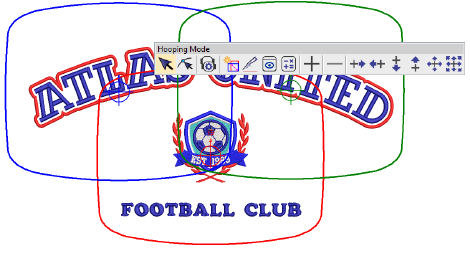
Toggle
Hoop > Hooping Mode on to access the multi-hooping toolset.
Use Hooping Mode > Multi-Hooping
Options to change multi-hooping options in the Multi-Hooping tab
of the Options dialog.
Use
Hooping Mode > Auto Layout Hoops to automatically add/rotate/delete
hoops and split lines to cover the entire design.
Use
Hooping Mode > Add Splitting Line to digitize one or more guides
in a multi-hoop layout to split objects between hoopings.
Use
Hooping Mode > Preview Hoopings to view hooping thumbnails
in the docker. Click a thumbnail to isolate hoopings.
Use Hooping
Mode > Calculate Hoopings to calculate hoopings resulting from
current layout.
Fabrics must be hooped before stitching
out on the machine. EmbroideryStudio allows
you to select from a wide range of standard factory-supplied hoops. If
your project contains a large design or a number of smaller designs, you
may need to use multiple hoopings.
EmbroideryStudio provides
a dedicated Hooping Mode toolbar which
allows you to specify multiple hoopings for large designs, both manually
or automatically.
EmbroideryStudio provides
a dedicated set of tools which for creating multiple hoopings manually.
Use these if you cannot achieve the result you want with the automatic
method. Use the Add
Hoop tools to add one or more hoop positions.
Tool
Description
Use
Hooping Mode > Add/Delete Hoop to add or remove hoopings in
a multi-hooping layout.
Use Hooping Mode > Add Hoop Left/Right
to place a new hooping to left or right of the selected hoop.
A 10mm overlap is allowed between sewing fields.
Use Hooping Mode > Add Hoop Up/Down to
place a new hooping above or below the selected hoop. A 10mm overlap
is allowed between sewing fields.
Use
Hooping Mode > Add N Hoops Around to generate 4/8 hoopings
around a selected hoop. A 10mm overlap is allowed between sewing
fields.