
Use Standard > Options to access application options for digitizing tools.
|
|
Use Standard > Options to access application options for digitizing tools. |
The digitizing tool settings affect the behavior of both Traditional Digitizing and Column A digitizing methods.
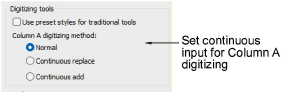
With the ‘Use preset styles for traditional tools’ option checked, five preset styles are activated. These apply to the Column A, Column B, Column C, Complex Fill, and Complex Turning tools. Default stitch type and underlay conform to the associated style. If you change stitch type or underlay, this applies throughout the current session. When the checkbox is unticked, current settings are used.
|
Traditional tool |
Cover |
Underlay 1 |
Underlay 2 |
|
Column A/B/C |
Satin |
Edge run |
Zigzag |
|
Complex/Turning fill |
Tatami |
Edge run |
Tatami |
The Column A or Digitize Column tools are used to digitize columns of varying width and stitch angle. The Column A settings affect both tools as follows...
|
Setting |
Effect |
|
Normal |
Use this for non-continuous input. |
|
Continuous replace |
Use this to continue digitizing the same object after each Enter keypress. |
|
Continuous add |
Use this to join objects of different size where different stitch types are used – e.g. a narrow section of satin stitch joining to a larger section of tatami. |
Products
EmbroideryStudio Add-ons
Solutions
Learning
Support
Connect
About Wilcom
