
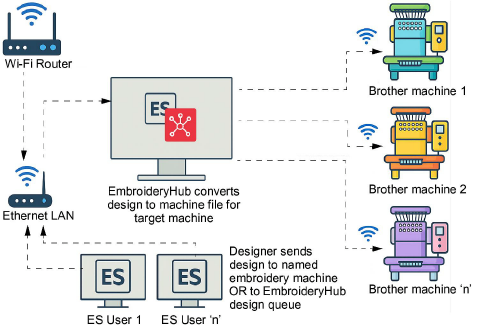
Use Standard > Send to Device/Machine to send the current design to a named embroidery machine via WLAN.
|
|
Use Standard > Send to Device/Machine to send the current design to a named embroidery machine via WLAN. |
With the latest update, EmbroideryStudio 2026 supports direct wireless design transfers to compatible Brother embroidery machines. This integration is the result of an ongoing collaboration between Wilcom and Brother Industries to modernize the embroidery workflow. No more USB drives, no more manual file copying – just send your designs straight from your computer to your machine over Wi-Fi.
3Faster workflow: Send designs instantly without leaving your desk.
3Simpler setup: Connect your Brother machine once, and it’s ready for use in EmbroideryHub.
3Less hassle: Eliminate USB transfers and reduce the chance of file errors.
3Integrated experience: Manage your machine connections directly within EmbroideryHub alongside other devices.
Ensure your Brother embroidery machine is one of the supported models. For instance:
3PR680W (6 needles)
3PR1055X (10 needles)
3PR1060W (10 needles)
Tip: Check with the Brother support website. Here you'll find support resources for your Brother product.
3Transferring files to machine
Products
EmbroideryStudio Add-ons
Solutions
Learning
Support
Connect
About Wilcom
