EmbroideryStudio occupies up to 5 GB of hard disk space, depending on options installed. CorelDRAW® Graphics Suite also takes up an additional 3 GB. However, you need additional free space for your applications to run smoothly. Check that your hard disk has enough space to run EmbroideryStudio effectively. After installation you will need 40 GB free or 10% of your total hard drive space, whichever is the greater amount.
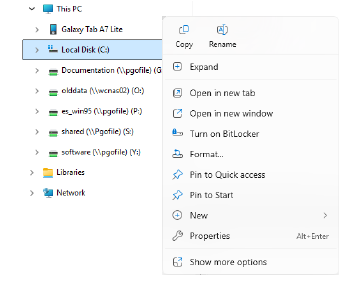
1Go to This PC in File Explorer and right-click the Local Disk (C:) to open the popup menu.
2Select Properties to open the Properties dialog.
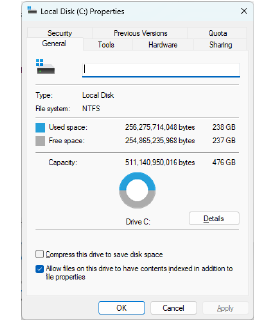
3Go to the General tab. This tab shows the hard-disk capacity as well as any free space.
Products
EmbroideryStudio Add-ons
Solutions
Learning
Support
Connect
About Wilcom
