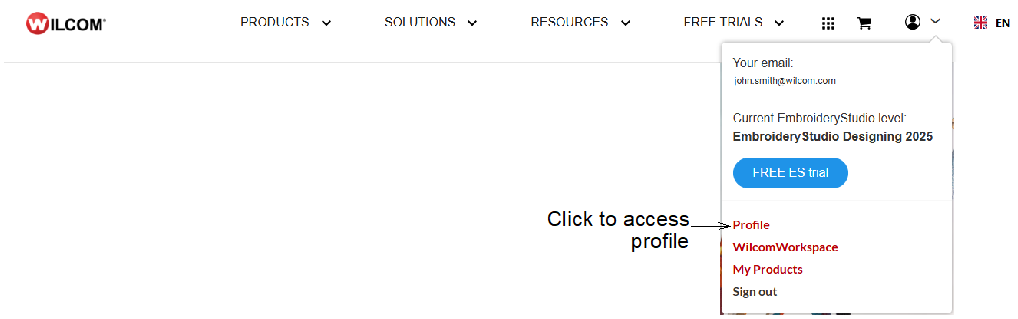
Wilcom User Account is a cloud-based service designed to enable registered Wilcom Account holders to manage multiple licenses and users of various Wilcom ‘apps’ (applications) under a single account. From the top of the Wilcom website you can access your account via the dropdown menu...
Wilcom ‘apps’ currently supported by the service include...
|
App |
Details |
|
Truesizer |
A Wilcom app that allows users to view, resize, and convert embroidery design files without altering stitch quality. It is often used for previewing and basic modifications. |
|
Estimator |
A Wilcom app that calculates the estimated stitch count and cost of an embroidery design before actual production. |
|
EmbroideryStudio |
Wilcom’s flagship embroidery digitizing software, designed for professional embroidery design creation, editing, and production management. (Versions previous to EmbroideryStudio Digital Edition are not supported at this time.) |
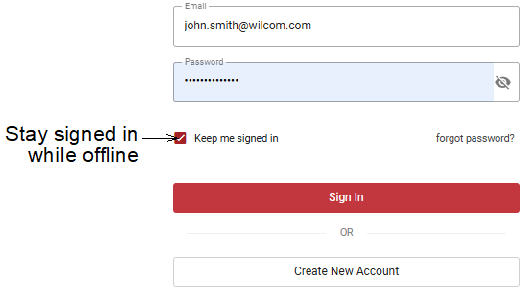
Each licensed copy of EmbroideryStudio is for a single user. You may install it on multiple computers but only one active session can be used at one time. In the Sign-in dialog, tick ‘Keep me signed in’. This means you will not have to enter your Wilcom User Account details each time you start the software.
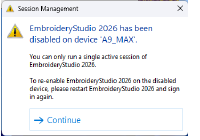
Caution: Simply uninstalling the software does not release the license. Select File > Sign Out and Exit before uninstalling. A warning message will appear if you attempt to run EmbroideryStudio on two PCs simultaneously.
Wilcom User Account allows for greater flexibility, enabling organizations to purchase and manage multiple licenses, add members, and assign or unassign licenses as necessary. Key functionalities include…
|
Multiple user management |
Add and manage multiple users within a single organization account. |
|
License management |
Purchase, assign, and manage multiple licenses of various Wilcom applications. |
|
Billing management |
View and manage subscriptions and payments for licenses. |
|
User security |
Implement two-step verification within the organization for added security. |
|
Reporting |
Analyze usage for Truesizer and Estimator and monitor login activity for all apps, across all users and licenses. |
Products
EmbroideryStudio Add-ons
Solutions
Learning
Support
Connect
About Wilcom
