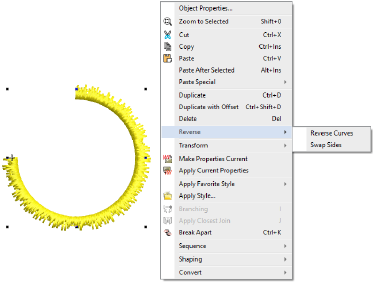
Stitch direction can affect appearance and embroidery quality because of the push-pull effect. The Reverse commands allow you to reverse stitching direction in different ways. They can be conveniently accessed via the popup (right-click) menu or via the Edit menu.
Reverse Curves can be applied to outline stitch types such as Run, E Stitch, Motif Run, etc.
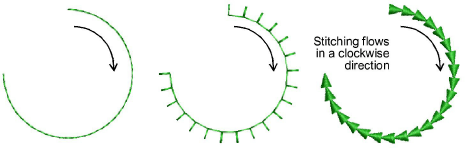
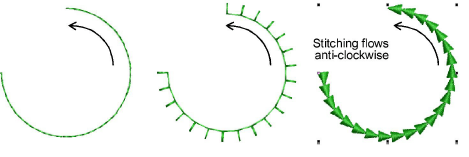
The command changes stitching direction in the selected object. In most cases, it has no visible effect, except with some motifs, as shown here...
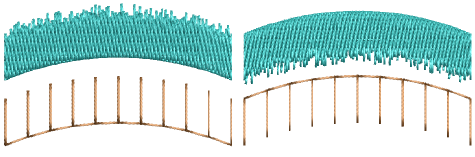
Reverse Curves can also be applied to selected Column A, Column B, and Column C objects. Its effect can be clearly seen with Accordion Spacing, where profile is reversed together with stitch direction.
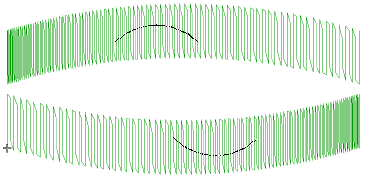
Notice too its effect when applied to self-intersecting Column A, Column B, or Column C objects, where overlaps are reversed together with stitch direction.
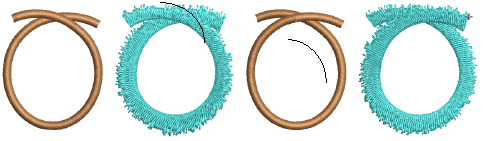
The Swap Sides command has a different effect which can be seen in objects with Jagged Edge or E Stitch applying. Typically it is used in conjunction with Column A and Column B objects.
Products
EmbroideryStudio Add-ons
Solutions
Learning
Support
Connect
About Wilcom
