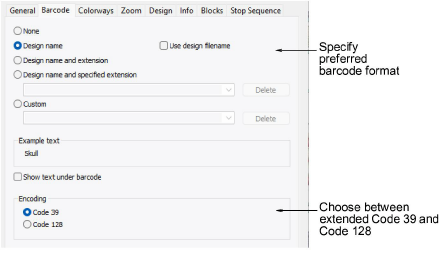
Some machines read barcodes in order to load designs. Typically, the digitizer will send the design to machine memory or database, then print out a worksheet. The operator will take the worksheet, scan the barcode, and the machine will load the associated file. The Barcode tab allows you to specify a standard format based on design name or a custom format.
Many companies are switching to barcode readers on embroidery machines to ‘pull’ designs from Windows network locations rather than having the computer ‘push’ them to the machine. In addition to design name, some machines require the file extension. Amongst the barcode options, you can choose to include the current file extension or nominate one of your choice – e.g. ‘DST’. The ‘Example text’ field updates according to your choice of format.
The ‘custom’ option is provided in case you have other barcode requirements – e.g. for pricing purposes.
The ‘encoding’ setting lets you choose between extended Code 39 (the default, unchanged from previous versions) and Code 128, making it easy to match your machine or scanner requirements.
Products
EmbroideryStudio Add-ons
Solutions
Learning
Support
Connect
About Wilcom
