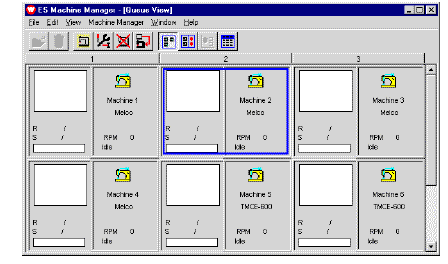
Machine View displays details for all the machines in a factory. It shows:
3Machine reference number – e.g. ‘Machine 1’
3Machine model – e.g. ‘Melco’
3Name and icon of last design downloaded
3Number of stitches and colors in the design.
1Start Machine Manager. See Running Machine Manager for details.
2Select View > Machine View.
3If no design is running on a machine, only the machine’s reference information and status are displayed.
3For machines without feedback, download progress displays as a percentage.
3When the design is downloaded, status displays as ‘Downloaded & Stitching’.
3Machines with serial feedback show the actual stitching progress of the current design and current machine status.
Products
EmbroideryStudio Add-ons
Solutions
Learning
Support
Connect
About Wilcom
