
Click Hoop > Hoop Options to configure hoop lists, change hoop position settings, and define custom hoops.

Click Hoop > Show Hoop to turn hoop display on or off. Right-click to change hoop settings.
|
|
Click Hoop > Hoop Options to configure hoop lists, change hoop position settings, and define custom hoops. |
|
|
Click Hoop > Show Hoop to turn hoop display on or off. Right-click to change hoop settings. |
A range of commercial brands is available in EmbroideryStudio for a wide variety of machines and design types. The My Hoops option allows you to define a filtered list of those hoops you have available for use. If you are using a hoop not appearing in the hoops list, the Options > Hoop tab also lets you define your own and save for later use.
1Click Hoop Options or right-click the Show Hoop icon. The first time you run it, the Options dialog will open with the My Hoops dialog already opened. Otherwise, click the My Hoops button.
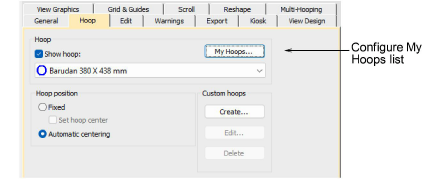
2Use the My Hoops dialog to set up your own list of available hoops. Optionally, use the Search bar to filter the list by hoop type. You can enter numbers – e.g. ‘150 x 150’ – or character/s, to filter both lists at the same time.
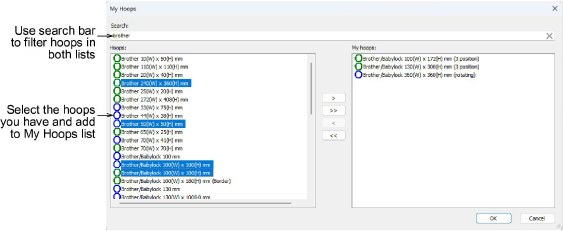
Note: The blue icon indicates a hoop for a multi-needle type machine.
3Select your hoops from the Hoops list.
3To select a range, hold down Shift then select first and last.
3To select multiple items, hold down Ctrl and click.
4Use the arrow buttons (or double-click) to assign to My Hoops. Use the reverse arrows to move any selected hoops back.
5Click OK to confirm.
3Only hoops from the My Hoops list will be available for manual or automatic selection.
3You may be working with hoops which don’t appear in the standard hoop list. Define your own hoops using circle, oval, rectangle, and other shapes.
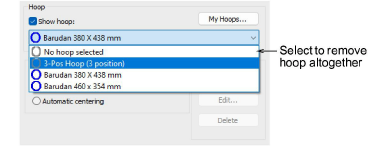
3When removing a hoop from the My Hoops list, it will persist in the droplist while it remains the currently selected hoop. Select ‘No hoop selected’ and close the dialog to remove the hoop altogether.
Products
EmbroideryStudio Add-ons
Solutions
Learning
Support
Connect
About Wilcom
