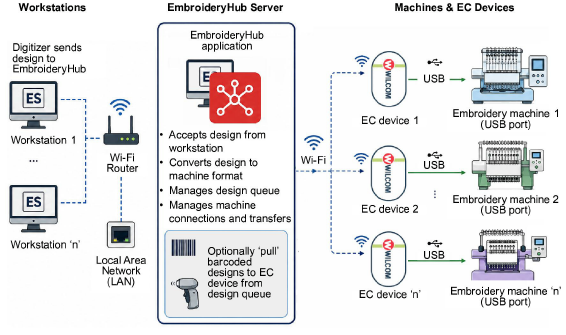
EmbroideryConnect extends EmbroideryHub support to embroidery machines that do not provide built-in network connectivity. It enables compatible USB-capable embroidery machines to receive embroidery designs wirelessly over your local network. This eliminates the need to manually transfer files using USB memory sticks.
EmbroideryConnect is particularly suited to commercial embroidery environments with mixed machine fleets. It enables newer network-connected machines and existing USB-based machines to operate within the same EmbroideryHub workflow.
EmbroideryConnect supports several production workflows:
3Send a design directly from EmbroideryStudio to a selected embroidery machine.
3Queue designs for later production.
3Allow machine operators to retrieve queued designs using the optional barcode scanning workflow.
3Manage multiple machines from a central EmbroideryHub installation.
Most modern commercial embroidery machines can read designs from a standard USB memory stick. These include models from Tajima, Barudan, ZSK, Ricoma, SWF, and many other manufacturers. EmbroideryConnect leverages this capability by presenting transferred designs to the machine through its USB interface. A separate device is needed for each embroidery machine on the network.
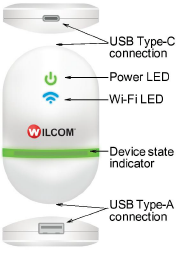
Device features are summarized below:
|
Item |
Description |
|
EmbroideryConnect device |
The device itself is small and compact. It can plug directly into an embroidery machine USB port via USB cable. |
|
USB Type-C connection |
USB Type-C connection at top to connect device to computer or embroidery machine. |
|
USB Type-A connection |
Used for USB barcode scanner. |
|
Device state indicator |
The device displays basic status information. See Send designs to EmbroideryConnect device for details. |
|
Power from USB |
No separate power supply needed. Power is drawn from USB port. |
|
Mounting strips |
The EC device comes with mounting strips to attach it to the target machine. |
Products
EmbroideryStudio Add-ons
Solutions
Learning
Support
Connect
About Wilcom
