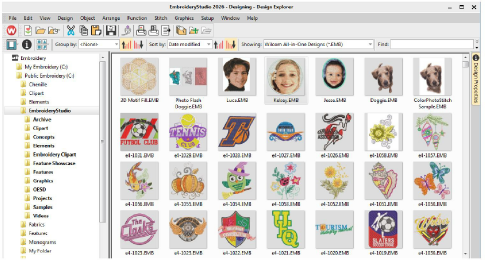
Design Explorer is an in-built design management tool. Use it to browse design and artwork files stored on your PC or local network. Design Explorer capabilities make it fast and practical for daily commercial use, avoiding the need to switch to and from File Explorer. It recognizes all file formats used by EmbroideryStudio. It also makes it easy to search, sort and browse all embroidery designs on your network.
If you are already familiar with File Explorer, the interface will be quite intuitive to you. But there are some differences. Design Explorer is a ‘virtual library’ in that any designs on your system can be located and displayed within the navigation pane. Any folder containing embroidery designs which resides on your hard disk, external storage device, or local network can be included in the navigation pane. See Design Management for details.
3Navigating with File Explorer
Products
EmbroideryStudio Add-ons
Solutions
Learning
Support
Connect
About Wilcom
