Every embroidery object carries its own set of properties. These properties define not only its physical appearance – such as size and position – but also critical embroidery characteristics like stitch type, density, underlay, and pull compensation. Properties can be thought of in three categories:
3Default properties, which come from templates and/or fabric settings.
3Current properties, which are applied to all newly created objects within an active design session.
3Actual properties, which belong to individual objects and can be customized at any time.
This hierarchy ensures that objects inherit sensible starting values but remain flexible for fine adjustments.
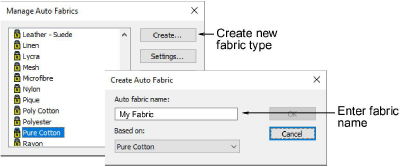
Fabric is one of the most decisive factors in embroidery quality. Stitches interact differently with woven cotton, stretchy knits, or heavy canvas, and improper settings can lead to distortion, gaps, or puckering. To address this, EmbroideryStudio offers optimized fabric settings that automatically adjust key properties such as density, underlay, and pull compensation. Fabric settings refine template defaults, ensuring that designs are tailored to the material on which they will be stitched.
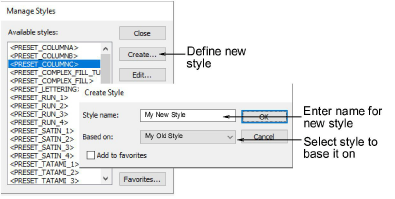
Where properties and fabrics address precision, styles address speed and standardization. A style is simply a named collection of property settings. By applying a style, digitizers can instantly impose consistent stitch characteristics across multiple objects or lettering. Styles can be modified, saved, and even ‘favorited’, creating a practical library of embroidery approaches that can be reused across projects.
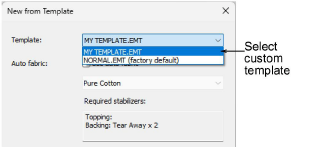
At the lowest level, templates act as containers for all the other elements – defaults, fabrics, and styles. They establish the starting point for new designs, whether by applying general-purpose defaults – as in the NORMAL template – or by incorporating fabric-specific adjustments and preferred styles. Templates reduce repetitive setup and support efficient workflows for frequently used design types.
These four elements form a cascading system:
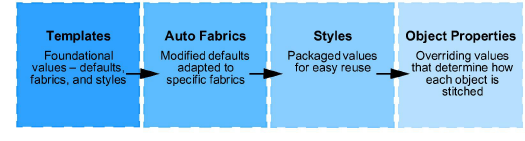
By understanding how these levels interact, digitizers can control every aspect of their work – from overall design consistency down to the finest stitch detail – while minimizing errors and saving time.
Products
EmbroideryStudio Add-ons
Solutions
Learning
Support
Connect
About Wilcom
