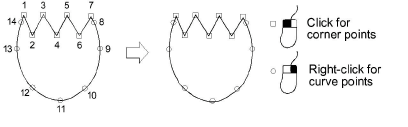
Once you have selected a digitizing method, you create shapes by marking points along an outline.
Use the left mouse button for corner points and right mouse button for curve points. Press Enter to complete a shape.
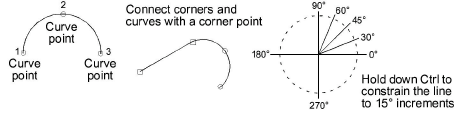
A few general rules apply:
3To constrain the line to 15° increments, hold down Ctrl as you digitize.
3For a perfect circular arc, mark three points with a right-click, and press Enter.
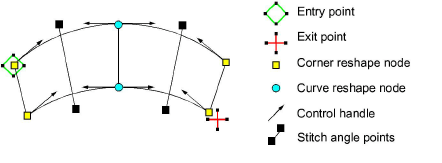
The reference points you mark when digitizing a shape become its ‘control points’. These vary slightly with the object type. Most points can be added, deleted, or moved. Corner and curve points can be interchanged. Bézier control handles are available when you modify a shape. Some control points such as entry and exit points cannot be deleted.
Products
EmbroideryStudio Add-ons
Solutions
Learning
Support
Connect
About Wilcom
