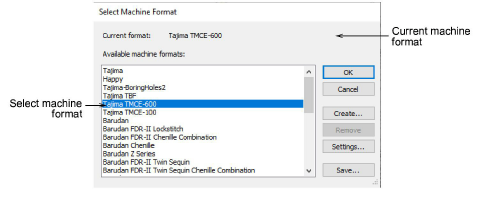
Once a design is complete, you can output to any supported embroidery machine without changing the original machine format. Explicit support is provided for these machine types:
3Tajima TBF
3Tajima TMCE-100
3Tajima TMCE-600
3Barudan FDR-II Chenille Combination
3Barudan Chenille
3Barudan FDR-II Twin Sequin Chenille Combination
3Barudan FDR-3
3Barudan FDR-3 Chenille Combination
3Melco Chenille
If a selected machine format does not support a particular function in the design – either automatically or manually inserted – it is simply ignored.
3Select Design > Select Machine Format.
3Select the required chenille machine format from the list.
3To check the settings for the selected format, click Settings.
3Click OK.
Products
EmbroideryStudio Add-ons
Solutions
Learning
Support
Connect
About Wilcom
