
Select a hoop from the My Hoops droplist.

Click Hoop > Show Hoop to turn hoop display on or off. Right-click to change hoop settings.

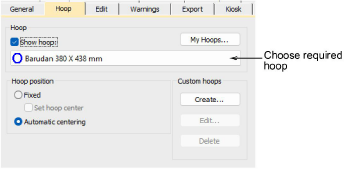
Click Hoop > Hoop Options to configure hoop lists, change hoop position settings, and define custom hoops.
A range of commercial brands is available for a wide variety of design types. Configure the My Hoops list to include only those hoops you currently have available for use. If you are using a hoop that is not in the hoops list, you can define your own and save it for later use.
Configure the My Hoops list to include only those hoops you currently have available for use. This list can include commercial brands as well as your own custom-defined hoops. The dialog includes a Search bar to filter the list by hoop type.
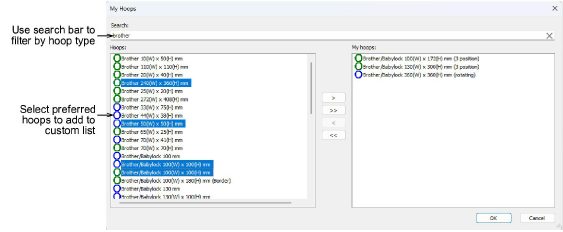
The Options > Hoop dialog lets you choose and set up your hoops.
Products
EmbroideryStudio Add-ons
Solutions
Learning
About Wilcom

|
Copyright ©2025 Wilcom Pty Ltd | Terms of Use | Privacy Policy |