
Use Fills > Tatami to create fills for larger irregular shapes. Right-click for settings.

Use Outlines > Tatami to create borders or columns of even width for different needle penetration patterns.
|
Use Fills > Tatami to create fills for larger irregular shapes. Right-click for settings. |
|
Use Outlines > Tatami to create borders or columns of even width for different needle penetration patterns. |
Tatami stitch consists of rows of run stitches and is suitable for filling large shapes. It can also be used to create borders or columns of even width for different needle penetration patterns. Settings can be accessed via Object Properties > Outlines and Object Properties > Fills tabs.
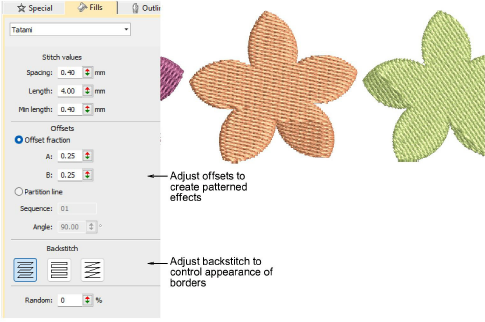
3Creating textures with tatami offsets
Products
EmbroideryStudio Add-ons
Solutions
Learning
About Wilcom
|
Copyright ©2025 Wilcom Pty Ltd | Terms of Use | Privacy Policy |