|
|
Use Pointer > Select to select a single stitch or block of stitches. |
|
|
Use Pointer > Polygon Select to select irregular areas or shapes. |
|
|
Use Pointer > Select to select a single stitch or block of stitches. |
|
|
Use Pointer > Polygon Select to select irregular areas or shapes. |
The Select and Polygon Select tools work in a similar way to EmbroideryStudio. The difference is that in ES Cross Stitch you work with stitch blocks or areas rather than design objects.
With the Select tool selected, simply drag a bounding box around the area to be selected.
With the Polygon Select tool selected, mark reference points around the area you want to select and press Enter.
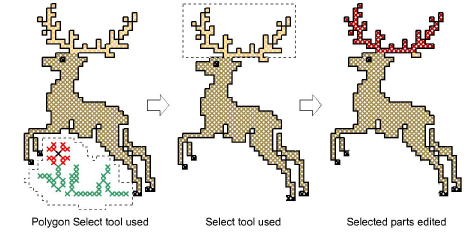
Tip: Hold down Ctrl to select multiple areas.
|
Copyright ©2024 Wilcom Pty Ltd | Terms of Use | Privacy Policy |