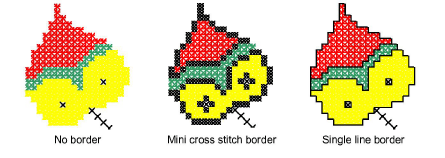
Add a cross stitch border or a single line border, or both, to selected areas of a design.
1Select either the Single Line or Full Cross icon.
2Click the Flood Fill icon and click inside an area. A line of outline stitches is added around the edges of the selection.
Tip: Click again in the selection to add another line of stitches inside the first line.
Tip: To combine a cross stitch with a line border, select Full Cross stitch type and Flood Fill, then select Single Line and Flood Fill again.
|
Copyright ©2024 Wilcom Pty Ltd | Terms of Use | Privacy Policy |