|
|
A common problem with cross stitch designs is that they ‘pull’, especially with smaller, closely packed stitches. Cross stitch designs tend to pull in a uniform way with gaps usually forming in straight lines. Sometimes holes appear giving the impression of missing stitches. To mitigate these problems, you can adjust cross stitch density by stitching once, twice or three times. The number of ‘crossovers’ correspond to the values 2, 4 and 6 in the Threads list. You can change these values at any time.
Select a value from the dropdown Threads list. The value 2 corresponds to a single stitch, 4 is double, while 6 is triple. This is represented on screen by line thickness.
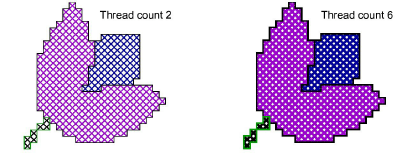
Tip: When you move your mouse over the stitch, a tool tip will tell you the type and color of stitch used.
|
Copyright ©2024 Wilcom Pty Ltd | Terms of Use | Privacy Policy |