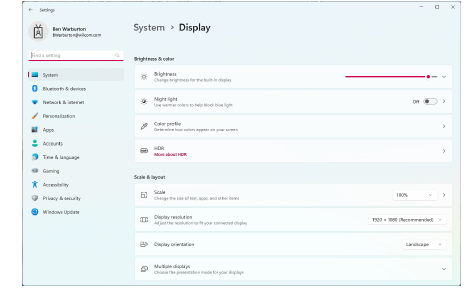
Some controls may be hidden on the user interface if you run your monitor at low resolutions. The physical size of your monitor will have a bearing on the optimum screen resolution. Larger fonts will exacerbate the problem.
1Go to MS Windows® Settings and open the Display tab.
2If you experience visibility issues, try adjusting both screen resolution and font size. For example, a resolution of 1920 x 1080 with a font size of 100% or 125% should be acceptable.
Software Products
EmbroideryStudio add-ons
|
Copyright ©2025 Wilcom Pty Ltd | Terms of Use | Privacy Policy |